
XSolutions IT
  • About ▾
    • About Us
    • Our Process
    • Our Reviews
    • Refer and Earn
  • Solutions ▾
    • Complete Managed IT
    • Co-Managed IT
    • Managed Cybersecurity
    • Backup & Disaster Recovery
    • Cloud Data Protection
  • Industries ▾
    • Law Firms
    • Construction + Trades
    • Distribution + Supply Chain
    • Nonprofits
  • Service Areas▾
    • Rockland County NY
    • Westchester County NY
    • Bergen County NJ
  • Resources ▾
    • Free Resources for Law Firms
    • Free Resources for Construction
    • Free Resources for Distributors
    • Free Resources for Nonprofits
    • Newsletters
    • Blogs
  • Contact
  • 877-807-1332
  • Menu Menu

10 Keyboard Shortcuts Everyone Should Know

July 7, 2026/in Blog/by Michael Layland

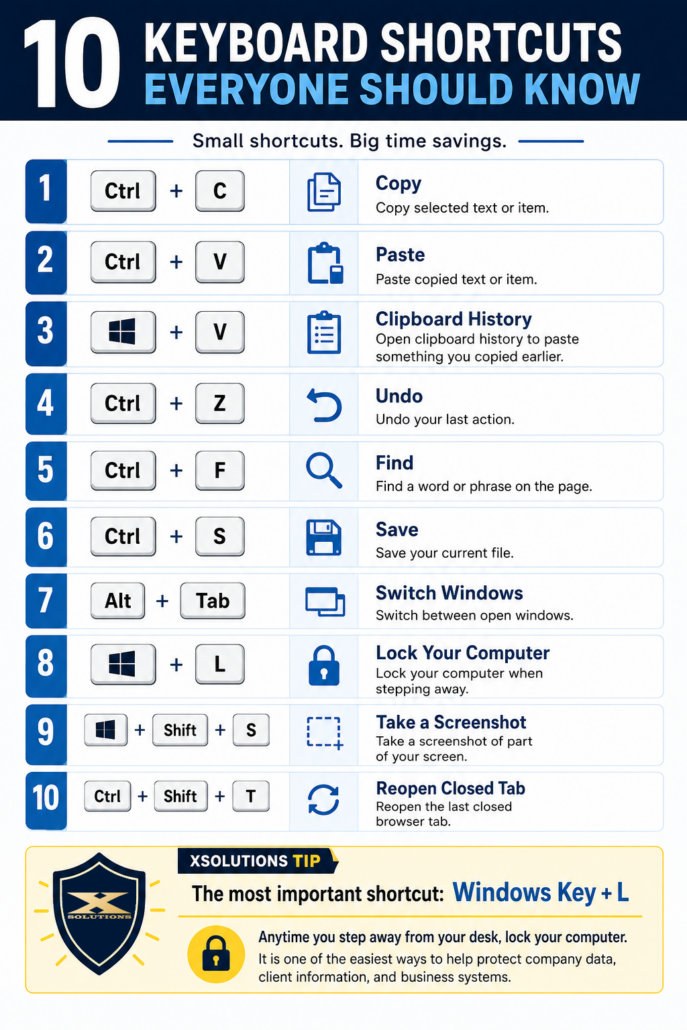
DOWNLOAD THE PRINTABLE KEYBOARD SHORTCUT GUIDE FOR YOUR TEAM HERE

Small shortcuts. Big time savings.

Most business owners do not lose hours because of one giant mistake.

They lose them in tiny pieces.

A few seconds searching through menus. A few clicks to copy and paste. A few minutes trying to find something on a page. A quick scramble to reopen a tab that disappeared right before you needed it.

None of that feels like much in the moment.

But across an entire team, across an entire workweek, it adds up.

That is why basic keyboard shortcuts are still worth teaching. They are simple, easy to remember, and genuinely useful for almost every employee, whether they work in legal, construction, distribution, accounting, operations, or administration.

Here are 10 keyboard shortcuts everyone should know.

1. Ctrl + C, Copy

This is the classic.

Use it to copy selected text, files, folders, images, or other items.

It is faster than right-clicking, faster than using the toolbar, and one of the easiest habits to build.

2. Ctrl + V, Paste

Copy gets paired with paste.

Once you have copied something, Ctrl + V drops it where you need it.

This is useful for emails, documents, spreadsheets, file names, web forms, and just about everything else you touch during the day.

3. Windows Key + V, Clipboard History

This one is underused.

Most people know how to copy and paste one thing at a time. Clipboard History lets you pull up things you copied earlier.

That means if you copied a phone number, then copied an email address, then copied a paragraph, you may still be able to go back and grab the earlier items instead of hunting them down again.

For people who live in email, spreadsheets, CRMs, proposals, or ticketing systems, this can save a lot of annoying backtracking.

4. Ctrl + Z, Undo

Mistakes happen.

You delete the wrong sentence. Move the wrong file. Type over something you meant to keep. Format a document in a way that looks awful.

Ctrl + Z is the panic button.

It undoes your last action and often saves you from having to rebuild something manually.

5. Ctrl + F, Find

This is one of the most useful shortcuts in business.

Use Ctrl + F to find a word or phrase on a webpage, in a document, in a PDF, or inside many applications.

Looking for a client name? A dollar amount? A policy section? A product code? A specific phrase in a long email chain?

Ctrl + F gets you there faster.

6. Ctrl + S, Save

Yes, a lot of programs autosave now.

No, that does not mean you should fully trust autosave every time.

Ctrl + S is a good habit, especially when working on important files, spreadsheets, proposals, or documents with a lot of changes.

It takes less than a second and can save you from a very frustrating situation.

7. Alt + Tab, Switch Windows

If you constantly jump between programs, Alt + Tab is your friend.

It lets you switch between open windows without reaching for the mouse.

That is useful when you are comparing two documents, moving between email and your browser, checking notes during a call, or working through multiple systems at once.

8. Windows Key + L, Lock Your Computer

This is the most important shortcut on the list.

Windows Key + L locks your computer instantly.

Anytime you step away from your desk, even for a minute, lock your screen.

This protects company data, client information, internal systems, email accounts, and anything else you have open.

It is one of the easiest security habits to teach, and it costs nothing.

9. Windows Key + Shift + S, Take a Screenshot

This opens the screenshot tool so you can capture part of your screen.

That is useful when you need to show an error message, document an issue, send instructions, or capture something for a ticket.

Instead of taking a picture of your monitor with your phone, use this shortcut.

Your IT team will thank you.

10. Ctrl + Shift + T, Reopen a Closed Tab

Everyone has done it.

You close the wrong browser tab, then immediately regret it.

Ctrl + Shift + T reopens the last closed tab.

It is simple, but it can save time when you are working in browser-based systems like Microsoft 365, QuickBooks Online, CRMs, vendor portals, project management tools, or cloud apps.

The Real Point

Keyboard shortcuts are not just “computer tricks.”

They are small habits that make people faster, smoother, and less frustrated during the workday.

The best part is that they do not require a new tool, a new license, or a big training program. Most employees can learn these in a few minutes and start using them right away.

Start with the basics.

Copy. Paste. Undo. Find. Save.

Then make Windows Key + L non-negotiable.

Because saving time is great, but protecting company data matters even more.

XSolutions Tip

The next time you walk away from your desk, use this shortcut:

Windows Key + L

Locking your computer is one of the easiest ways to protect company data, client information, and business systems.

No extra software. No complicated process. Just one simple habit that makes your workplace more secure.


Tags: Business Technology, computer security, cybersecurity habits, employee tech tips, IT Support, keyboard shortcuts, small business IT, Windows shortcuts, workplace productivity, XSolutions
Share this entry
  • Share on Facebook
  • Share on X
  • Share on Pinterest
  • Share on LinkedIn
  • Share on Reddit
  • Share by Mail
https://xsolutions.com/wp-content/uploads/2026/07/XSolutions-Shortcut-Guide.png 1536 1024 Michael Layland https://xsolutions.com/wp-content/uploads/2023/09/XSol-Logo-header-300x138.png Michael Layland2026-07-07 11:54:302026-07-20 16:10:5210 Keyboard Shortcuts Everyone Should Know
You might also like
Can Lawyers use AI to Draft Contracts? Can Lawyers Use AI to Draft Contracts or Briefs? Legal AI Risks and Best Practices
Workers sitting around table full of charts Choosing your disaster recovery team
Blue Digital shield with graphics Continuity for Business Manufacturers
Dry January for Your Business: 6 Tech Habits to Quit Cold Turkey
people buying technology 5 things to consider (other than cost) when purchasing new technology
world-security How Managed Service Providers Are Leading the Charge in IT
code-function Save 13 Hours Per Year Per Employee Using This Simple Tip
business continuity planning 4 business continuity planning essentials (Part 2 of 2)
Free Checklist

Cybersecurity Checklist

Use this simple checklist to spot common cybersecurity gaps, strengthen your defenses, and start better conversations about protecting your business.

Recent Posts

  • 10 Hidden Technology Problems Costing Your Law Firm Billable Hours
  • Secure File Sharing for Law Firms | Managed IT Support
  • Managed IT Services & Cybersecurity for Law Firms in Rockland County, NY
  • 10 Keyboard Shortcuts Everyone Should Know
  • Why Summer Is a Risky Season for Business Cybersecurity
XSolutions Trademarked LOGO

XSolutions is a managed IT services and cybersecurity company based in New City, NY. Since 1999, we have helped businesses across Rockland County, Bergen County, Westchester County, Orange County, Northern New Jersey, and the greater NY/NJ/CT region reduce risk, improve reliability, and gain clarity over their technology. We specialize in proactive managed IT, cybersecurity, Microsoft 365, cloud, backup and disaster recovery, and strategic IT guidance for organizations with 15 or more computers.

Service Areas

    • Managed IT Nanuet, NY

    • Managed IT New City, NY

    • Managed IT Suffern, NY

    • Managed IT Rockland County

    • Managed IT Orange County

    • Managed IT Westchester County

    • Managed IT Putnam County

    • Managed IT Mahwah, NJ

    • Managed IT Ramsey, NJ

    • Managed IT Bergen County

    • Managed IT Essex County

    • Managed IT Passaic County

    • Managed IT Hudson County

Contact Us

20 Squadron Blvd., STE 320
New City, NY 10956
Sales: 877-807-1332
Support: 845-362-9675

Facebook  LinkedIn Twitter (X) YouTube


XSolutions® Consulting Services, LLC All rights reserved © 2026 | Privacy Policy | Sitemap
Link to: Why Summer Is a Risky Season for Business Cybersecurity Link to: Why Summer Is a Risky Season for Business Cybersecurity Why Summer Is a Risky Season for Business Cybersecurity Link to: Managed IT Services & Cybersecurity for Law Firms in Rockland County, NY Link to: Managed IT Services & Cybersecurity for Law Firms in Rockland County, NY Managed IT Services & Cybersecurity for Law Firms in Rockland County, N...
Scroll to top Scroll to top Scroll to top
XSolutions IT
This website uses cookies
To provide the best experiences, we use technologies like cookies to store and/or access device information. Consenting to these technologies will allow us to process data such as browsing behavior or unique IDs on this site. Not consenting or withdrawing consent, may adversely affect certain features and functions.
Functional Always active
The technical storage or access is strictly necessary for the legitimate purpose of enabling the use of a specific service explicitly requested by the subscriber or user, or for the sole purpose of carrying out the transmission of a communication over an electronic communications network.
Preferences
The technical storage or access is necessary for the legitimate purpose of storing preferences that are not requested by the subscriber or user.
Statistics
The technical storage or access that is used exclusively for statistical purposes. The technical storage or access that is used exclusively for anonymous statistical purposes. Without a subpoena, voluntary compliance on the part of your Internet Service Provider, or additional records from a third party, information stored or retrieved for this purpose alone cannot usually be used to identify you.
Marketing
The technical storage or access is required to create user profiles to send advertising, or to track the user on a website or across several websites for similar marketing purposes.
  • Manage options
  • Manage services
  • Manage {vendor_count} vendors
  • Read more about these purposes
View preferences
  • {title}
  • {title}
  • {title}
XSolutions IT
This website uses cookies
To provide the best experiences, we use technologies like cookies to store and/or access device information. Consenting to these technologies will allow us to process data such as browsing behavior or unique IDs on this site. Not consenting or withdrawing consent, may adversely affect certain features and functions.
Functional Always active
The technical storage or access is strictly necessary for the legitimate purpose of enabling the use of a specific service explicitly requested by the subscriber or user, or for the sole purpose of carrying out the transmission of a communication over an electronic communications network.
Preferences
The technical storage or access is necessary for the legitimate purpose of storing preferences that are not requested by the subscriber or user.
Statistics
The technical storage or access that is used exclusively for statistical purposes. The technical storage or access that is used exclusively for anonymous statistical purposes. Without a subpoena, voluntary compliance on the part of your Internet Service Provider, or additional records from a third party, information stored or retrieved for this purpose alone cannot usually be used to identify you.
Marketing
The technical storage or access is required to create user profiles to send advertising, or to track the user on a website or across several websites for similar marketing purposes.
  • Manage options
  • Manage services
  • Manage {vendor_count} vendors
  • Read more about these purposes
View preferences
  • {title}
  • {title}
  • {title}